AI search
How to prove a GEO change actually moved your AI visibility
AI answers change from run to run. Set a baseline, use control prompts and compare equal windows, so you can tell a real lift from noise.
Contents
No tool proves a GEO change caused a lift. You can make a convincing case: a baseline, one logged change, control prompts and repeated runs.
Here's the short version. AI answers change from run to run, so a single before-and-after check proves nothing. To show that a change worked, you need four things:
- A baseline long enough to show how much the number moves on its own.
- One change, with its date written down.
- A control group of prompts the change didn't touch.
- Two equal windows, compared on the same prompts, models and markets.
If your target prompts rose clearly more than the control, and the answers now cite or repeat your page, you have a strong case. It's still correlation, not causation. Say so in your report. That honesty is what makes the rest believable.
GEO (generative engine optimization) is the work of getting your brand named and cited in AI answers. This guide shows how to test it properly: the method step by step, the mistakes that produce false wins, and how we run it on our own brand in 3RD. I'll use our own numbers throughout, including the ones that don't flatter us.
Why we care about this more than most
I'll start with our own situation, because it's the reason this guide exists.
As I write this, 3RD is named in 0.2% of the AI answers to the 193 buyer questions we track. We rank ninth of fourteen against the tools buyers compare us with. When we asked our own product what to fix first, 3RD Agent said: build the pages that answer buyer-intent questions. This article is one of those pages.
So we're about to publish a lot of work, and we need to know which parts of it move anything. If we can't tell a real lift from noise, we'll double down on the wrong things. That's the same problem every marketing team doing GEO has right now.
A marketing lead put it plainly on a call with us: "We're doing all these things, they seem like the right things to do, but how do we actually see the impact of it?"
Why "did it work?" is hard to answer in AI search
In Google, you could check a ranking before and after a change. Rankings were fairly stable, so a move meant something. AI answers don't work that way, for three reasons.
- Answers vary. AI models are probabilistic. The same prompt can get a different answer tomorrow, with different brands and different sources.
- Change takes time. Models re-crawl and re-learn on their own schedule. Expect days to weeks between publishing and a measurable shift.
- Many things move at once. Competitors publish, models get updated, and demand is seasonal. Any of these can move your number in the same week as your change.
Here's what that looks like in practice. This is 90 days of daily visibility for our tracked category: 3RD and seven of the competitors we track.
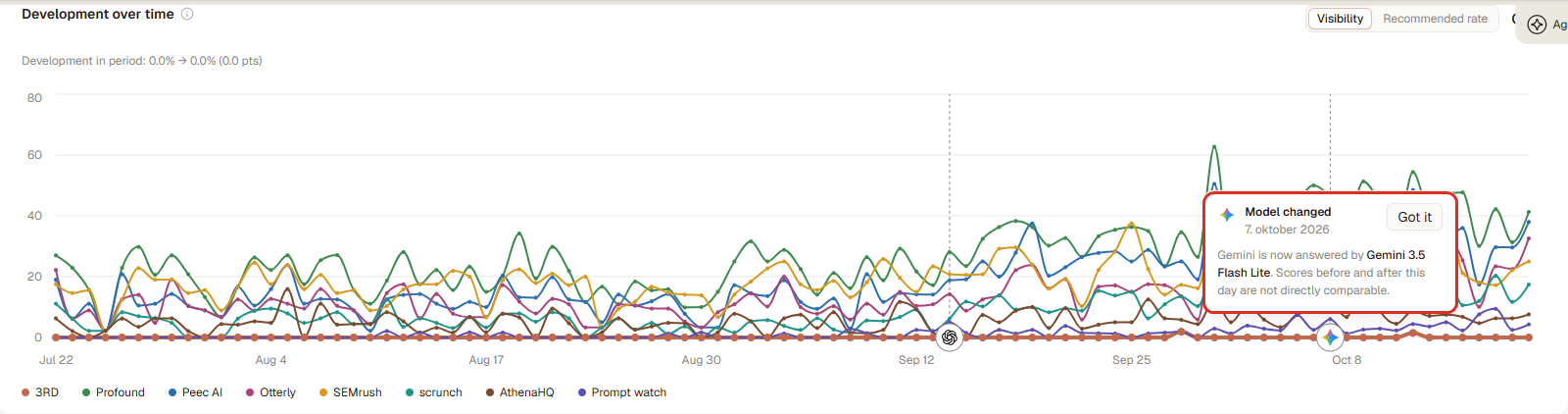
Ninety days of daily visibility in our category. Competitor scores swing 10 to 20 points from day to day, and the marker on October 7 shows Gemini switching model version, which breaks the series.
Two things stand out. The competitor lines jump by 10 to 20 points between days, with nobody shipping anything. And on October 7, Gemini started answering with a different model version. 3RD marks that on the timeline and says scores before and after that day aren't directly comparable. If you had published a page on October 6, any change you saw on Gemini could just as well be the new model.
So the question isn't "did the number go up?" It's "did the number go up more than it would have without our change?" The rest of this guide answers that second question.
Keep it separate from revenue. "Did our work move AI visibility?" can be answered. "Did AI visibility make us money?" can only be answered in part, because most AI answers never produce a click. That gets its own guide: how to connect AI recommendations and citations to revenue.
How big is the noise? Our data across 111 brands
We wanted a number for "normal noise", so we measured it across the brands we track.
Across 111 brands and 732,000 AI answers between September 19 and October 18, 2026:
- The median brand's visibility moved 12.5 points between its best and worst day in a single month, with no change to its prompts.
- For 7 in 10 brands (77 of 111), at least one single-day reading was more than 5 points away from the brand's own 30-day average.
- For about 1 in 4 (30 of 111), a single day was more than 10 points off.
- Small prompt sets are twice as noisy. Brands with fewer than about 100 answers a day had a median daily standard deviation of 4.5 points. Brands with 230 or more had 2.1.
|
Answers per day |
Median range, best day minus worst day |
Share of days more than 5 points off the 30-day average (median) |
|---|---|---|
|
- |
- |
- |
|
24–94 |
16.7 points |
30% |
|
101–229 |
10.3 points |
4% |
|
230–2,501 |
8.7 points |
4% |
Read that first row again. If you track a small set of prompts, almost a third of your days are more than 5 points away from your real average. A single check before and after a change is close to a coin toss.
What you need first
Before you change anything, have these in place:
|
You need |
Why |
|---|---|
|
- |
- |
|
A fixed prompt set |
The questions your buyers ask AI, written the way they ask them. If prompts change mid-test, the windows aren't comparable. |
|
Repeated runs |
Each prompt sent to each model on a schedule, ideally daily. One answer per day per model is the minimum to see a pattern. |
|
At least two weeks of history |
You can't judge a change until you know how much the number moves when you do nothing. |
|
A tracked competitor set |
Competitors are your best control. If everyone rose, the model changed, not your page. |
|
Access to the raw answers |
The number tells you that something changed. The answers tell you what changed. |
|
A change log |
The date and URL of every change: pages, outreach, technical fixes. |
If you check ChatGPT by hand today, you can still use this method, but you'll need a lot of manual runs. Given the noise numbers above, that's the main reason teams move to a tool.
Step 1: Write down what you expect, before you ship
Write one sentence before you publish anything:
"Publishing [page] will raise [metric] on [these prompts] in [market] on [models] within [weeks], compared with [control prompts]."
Here's ours for this article: "Publishing this guide will get 3RD cited on the 'Which tool can prove a GEO intervention moved our AI visibility?' prompts in the UK and Denmark within six weeks, compared with our other GEO Execution & Attribution prompts."
Writing it first stops you from hunting through the data afterwards for any number that went up. Pick one primary metric:
- Citations to the page if the change is a new or rewritten page. This is the most direct signal that AI used your work.
- Visibility (the share of answers that mention your brand) if you want to know whether you're in the conversation.
- Position or Recommended rate if you're already mentioned and want to win the choice.
A rule of thumb we use: for a brand-new page, judge it on citations first. Mentions come later, and for a brand starting near zero, like us, they come slowly.
Step 2: Choose target prompts and a control group
Target prompts are the questions the change is meant to win. Keep the list tight. Five to fifteen prompts on one topic is easier to read than fifty.
Control prompts are questions your change shouldn't affect. Good controls:
- sit in a different topic, so your new page won't answer them
- have similar commercial weight (compare Must-Win with Must-Win, not with broad research questions)
- run on the same models and in the same markets
Grouping your prompts by topic makes this easy. Each topic becomes a natural target or control group.
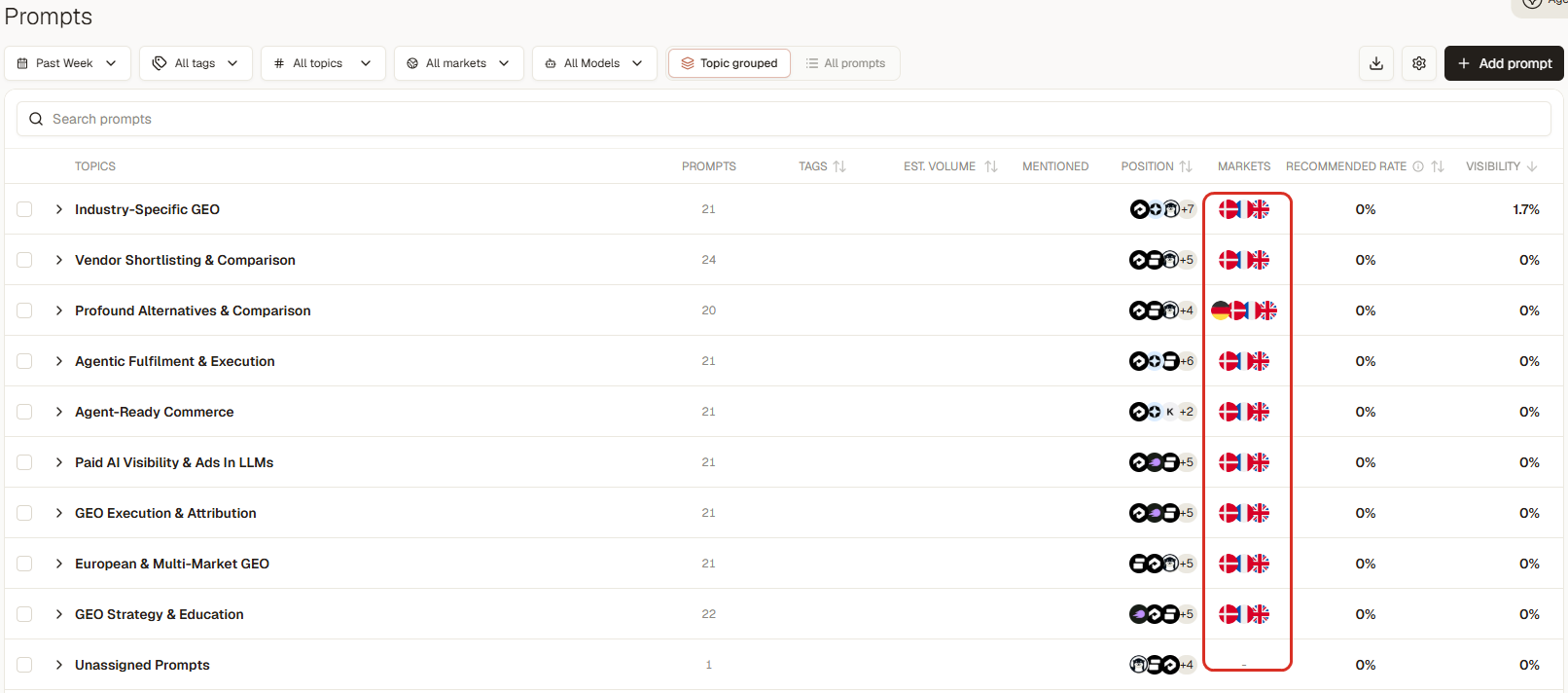
Our 193 buyer questions, grouped into nine topics and tracked per market. When we publish for one topic, the others become the control.
Add a second control: your competitors' visibility on the target prompts. If you rose 6 points and every competitor also rose 6 points, a model update probably lifted everyone.
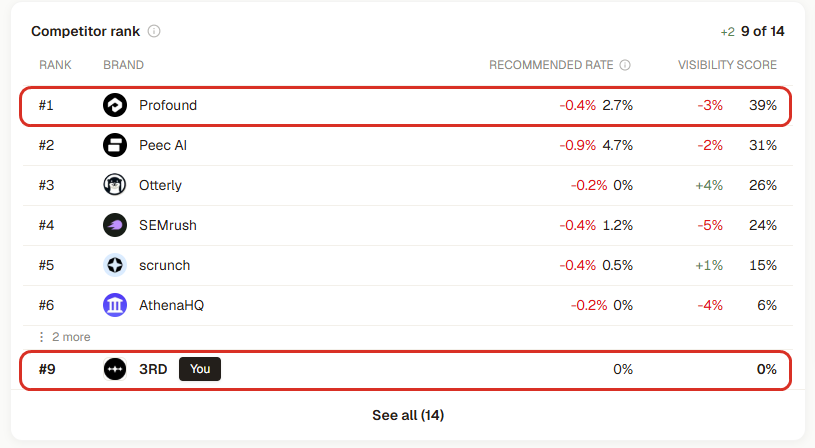
Our competitor control. If Profound, Peec AI and the rest move the same way we do, the model changed, not our page.
Step 3: Measure a baseline that shows the noise
Run the prompt set for at least two weeks before the change, and ideally four. Look at the spread, not only the average.
Our 111-brand data shows why. The median brand swings 12.5 points between its best and worst day in a month. One of our customers, Manyone, saw its daily visibility range from 1.4% to 8.5% within a single month. If you had checked once before a change and once after, you could have "proved" a 6-point win or a 6-point loss with no change at all.
Two simple statistics help:
- Use a window, not a day. Compare 14- or 28-day windows. A single day's number means very little.
- Count your answers. Every visibility number rests on a base, such as "1 mention in 639 responses". The fewer answers in the window, the bigger the swing you need before you believe it.
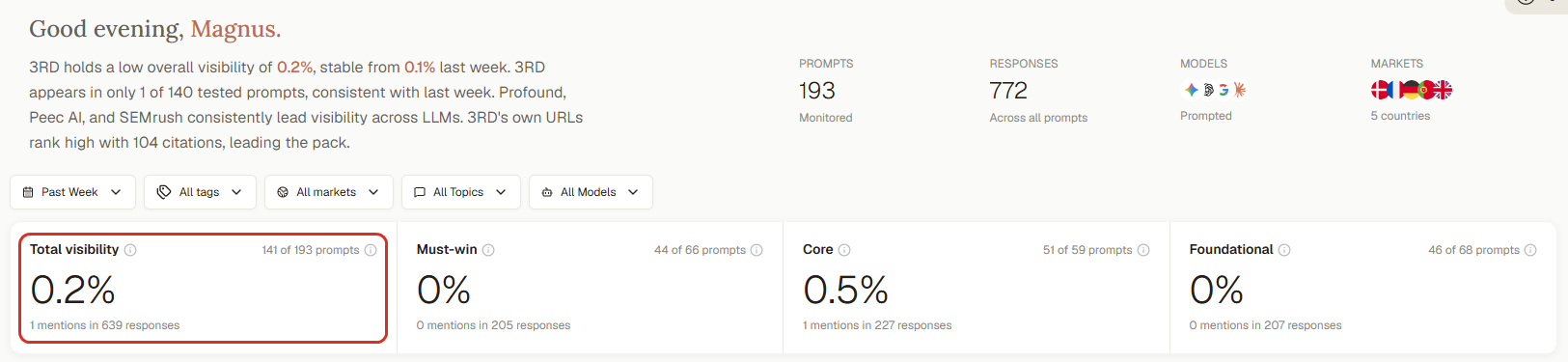
Every score shows its base. Our 0.2% rests on 1 mention in 639 responses, so we know exactly how thin it is.
A rough guide, assuming a true visibility of around 20%:
|
Answers in each window |
Swing you could see from noise alone (about 95% of the time) |
|---|---|
|
- |
- |
|
50 |
± 11 points |
|
100 |
± 8 points |
|
400 |
± 4 points |
|
1,000 |
± 2.5 points |
This is the standard margin of error for a share. Treat it as a floor. Answers from the same day and the same model tend to move together, so real noise is usually larger, which is exactly what our 111-brand data shows. The lesson is simple. More prompts, more models and more days give you a tighter reading. Five prompts checked by hand for a week can't detect anything smaller than a big jump.
Step 4: Ship one change and log the date
Change one thing at a time on the target prompts. If you publish a page, pitch three publications and fix your robots.txt in the same week, you won't know which one worked.
You can run several changes at once if they target different prompt groups. Each group then has its own test.
Log it the day it ships:
- the date
- the URL or the outreach target
- the prompts it's meant to move
- what you expect (from step 1)
Also note anything outside your control that happened that week: a model version change, a competitor launch, a news story in your category. You'll need it when you read the result.
Step 5: Make sure AI can actually reach the change
A test fails silently if the models never see your page. Before you start the clock, check:
- The page is live and not blocked. No `noindex`, not blocked in robots.txt, and not behind bot protection that stops AI crawlers.
- It's in your sitemap, with an accurate last-modified date.
- It reads without JavaScript. Some AI crawlers don't render scripts, so the key text should be in the HTML.
- It's linked from your site. An orphan page is found late, if at all.
We ran this check on our own site and it wasn't clean.
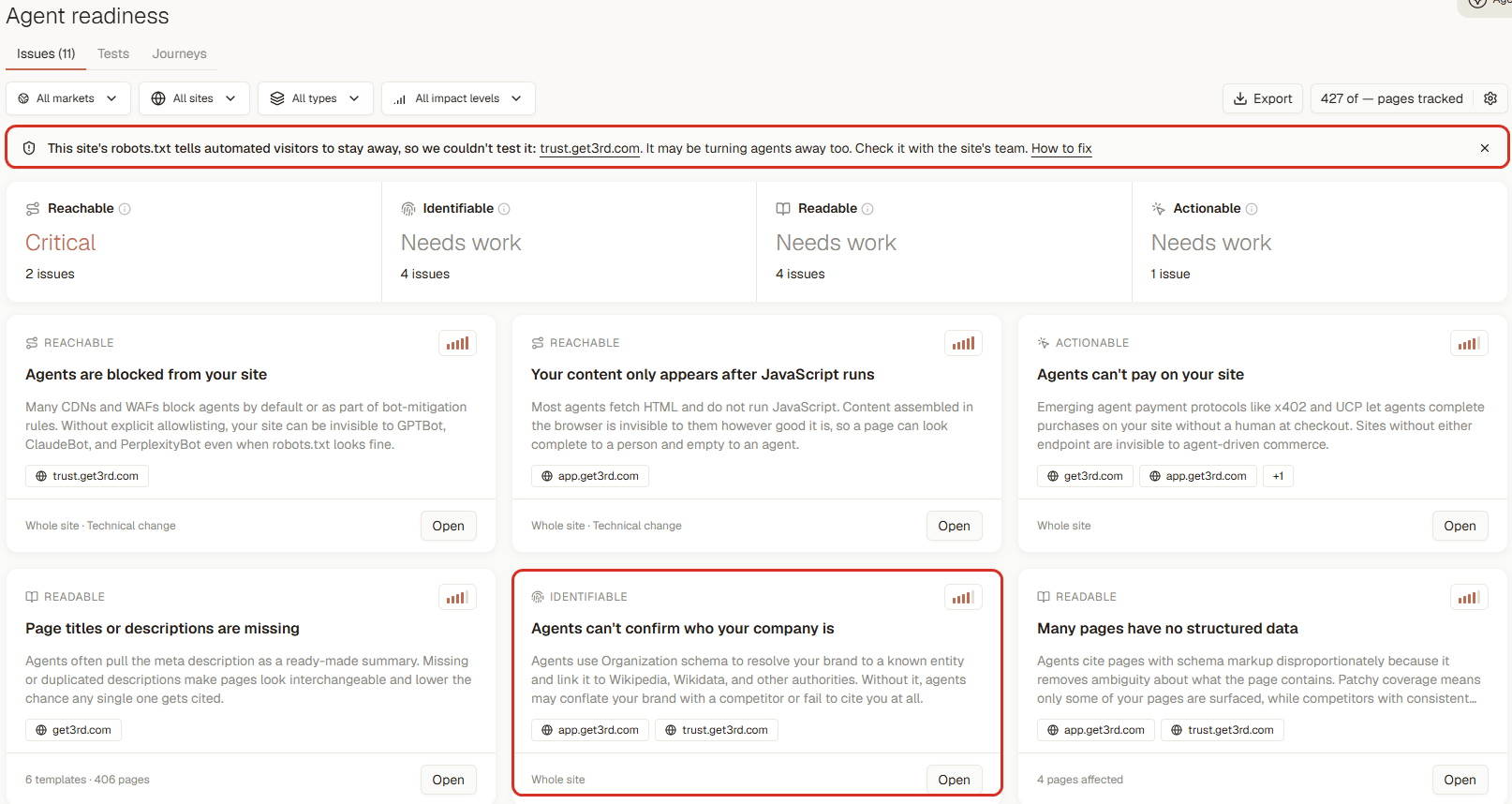
Our own agent-readiness report. The robots.txt on our trust site turns automated visitors away, and we have no Organization schema yet. Both go on the fix list before we judge any test that depends on them.
Count your test window from the day AI can reach the page, not the day you wrote it.
Step 6: Watch the leading signals first
Changes show up in a predictable order. Watch them in this order so you don't call a test dead too early:
- The page gets cited. Answers that search the web start listing your URL as a source. This can happen within days of crawling.
- Citation share rises. Your pages become a larger share of all the sources AI uses for these prompts. Citation share often rises before visibility does.
- Mentions rise. AI starts naming your brand in more answers.
- Position and recommendations improve. You move up the list, and AI starts telling buyers to pick you.
Our own account shows how far apart steps 1 and 3 can be. AI already cites our pages heavily: our homepage and our comparison pages are among the most-cited sources in our category. But it almost never names us in the answer.
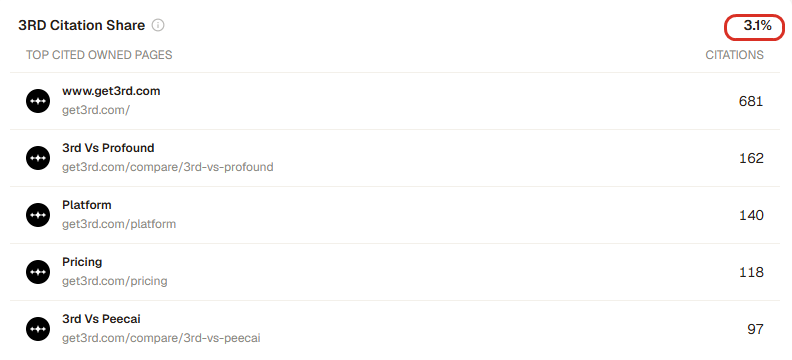
Our most-cited pages. AI reads and cites them, yet our visibility is 0.2%. Citations and mentions are different signals, and they move at different speeds.
If step 1 never happens after four to six weeks, the problem is probably reach or relevance, not the copy. Go back to step 5, or check whether the page answers the prompt directly.
Remember the split between live search and training. Answers that search the web can reflect your page soon after it's crawled. Answers drawn from what the model learned in training only change when a new model version comes out. That's one more reason to read results per model.
Step 7: Compare equal windows, target against control
Now compare. Use the same number of days before and after, the same prompts, the same models and the same markets. Leave out the first week after shipping if you know crawling takes time.
Calculate the change for each group, then the difference between them:
|
|
Before (28 days) |
After (28 days) |
Change |
|---|---|---|---|
|
- |
- |
- |
- |
|
Target prompts |
12% |
21% |
+9 points |
|
Control prompts |
15% |
17% |
+2 points |
|
Difference |
|
|
+7 points |
Illustrative numbers.
The +7 is your estimated effect: the part of the rise the control group didn't have. Analysts call this "difference-in-differences". It's the standard way to handle the "everything else changed too" problem.
Then sense-check it:
- Is +7 bigger than the noise you saw in the baseline? If your baseline swung ±8 points, it isn't convincing yet. Extend the window.
- Did the target prompts already trend up before the change? If so, part of the rise was already happening.
- Did competitors move the same way? If they all rose, look for a model update.
- Is the lift on every model, or one? A lift on one model only is real, but report it as such.
- Was there a model change in either window? If so, split the comparison at that date or extend the window past it.
Our rule of thumb: we don't call a result "moved" unless the target prompts beat the control by more than 5 points. Anything inside ±5 is "no lift yet".
Step 8: Read the answers to confirm the mechanism
Numbers tell you something changed. The answers tell you whether your change is the reason.
Open the answers for your target prompts from before and after:
- Is your new page among the cited sources?
- Does the answer repeat a fact, number or phrase that only exists on your page?
- Did a competitor drop out, or did a new source appear that you didn't touch?
One practical trick: put one specific, true and quotable fact on the new page that isn't published anywhere else, such as a figure from your own data. When answers start repeating it, you have direct evidence that AI read your page. The 111-brand noise numbers in this article are ours. If you see them in an AI answer, you'll know where they came from.
Step 9: Report it honestly
Write the result in one paragraph that leadership can read:
"We published a comparison page on 2 September. Over the next 28 days, visibility on the 8 target prompts rose from 12% to 21%. Our other Must-Win prompts rose 2 points over the same period, so the target prompts rose 7 points more. ChatGPT now cites the new page in 40% of answers to those prompts. Competitors were flat. We read this as a likely effect of the page. It isn't proof of cause, because models and competitors also change."
Illustrative example.
That last sentence protects you. The most experienced buyers we talk to aren't asking for proof. They're checking whether you'll pretend to have it.
Common pitfalls
These are the failure modes we see most, in our own work and in our customers' accounts.
|
Failure mode |
What happens |
Fix |
|---|---|---|
|
- |
- |
- |
|
The single check |
One reading before, one after. With a median 12.5-point monthly swing, you'll "prove" wins and losses that never happened. |
Compare 14- or 28-day windows. |
|
The moving prompt set |
New prompts change the average even if nothing else moved. |
Freeze the target and control prompts for the test. |
|
The moving competitor set |
Rank depends on who you track. Adding a competitor moves your rank without any change in the answers. |
Keep the competitor set fixed during the test. |
|
The pile-up |
Three changes on the same prompts in one week. You'll know something worked, but not what. |
One change per prompt group at a time. |
|
The early verdict |
Judging a content change after one week. |
Give it four to six weeks. Read citations first. |
|
The blended total |
A rise on research prompts hides a fall on the prompts closest to a purchase. |
Read Must-Win prompts on their own. |
|
The forecast as result |
An estimated impact score gets reported as an achieved lift. |
Keep "expected" and "measured" in separate columns. |
|
The visibility-only read |
The page gets cited, mentions haven't moved yet, and the test gets killed. |
Watch citations as the leading signal. |
|
The model switch |
A model version changes mid-test and the lift is really the new model. |
Note model changes and split the windows at that date. |
A worked example in 3RD: our own outreach test
Here's a real test from our own account, with the result we got. It didn't go the way we hoped, which is why it's useful.
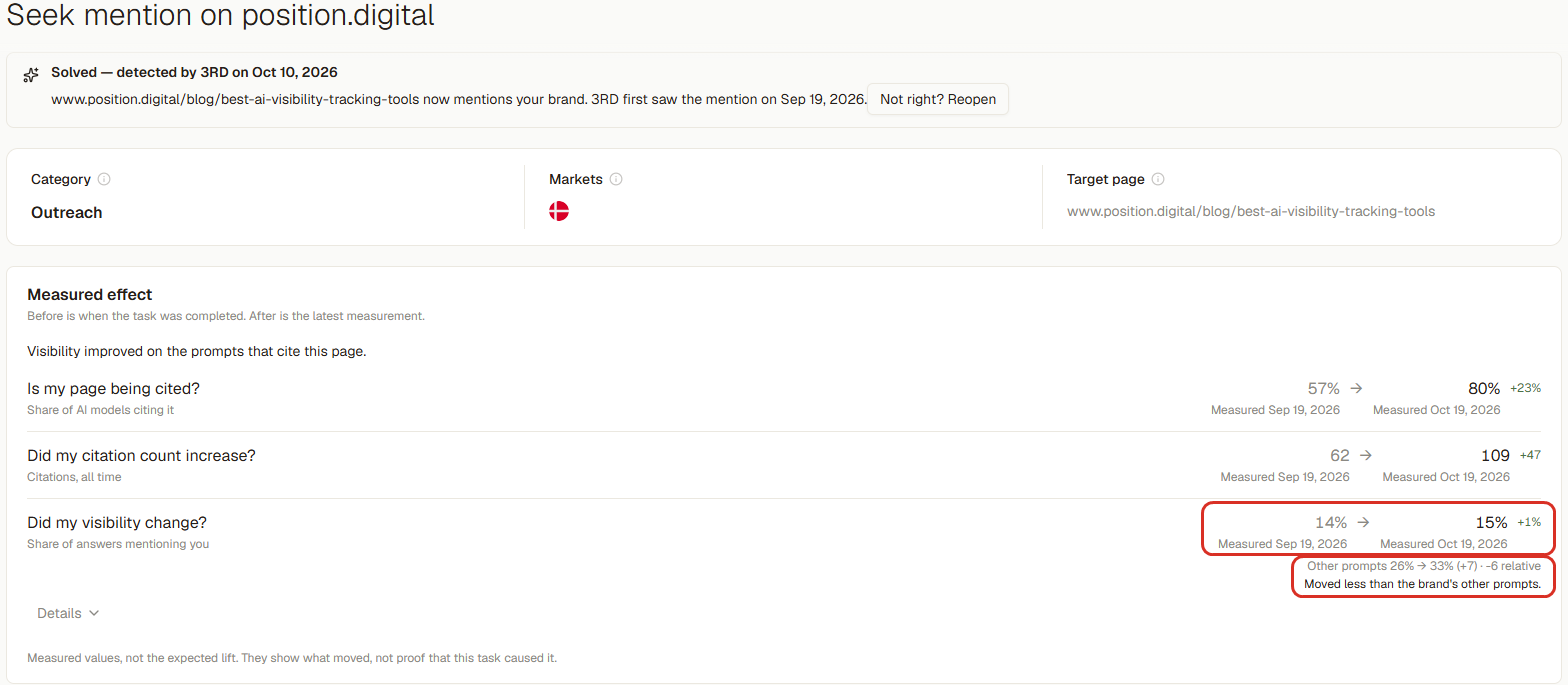
The change. In September, we earned a mention on a third-party "best AI visibility tracking tools" page that AI already cites in our category. 3RD flagged the page as an outreach opportunity, tracked the task, and detected the mention by itself. It first saw it on September 19, 2026.
What 3RD measured afterwards. When a task is completed, 3RD measures what moved from that day to the latest reading. It shows three questions on the task:
The measured effect of our outreach win. More AI models now cite the page, but visibility on the prompts that cite it moved less than our other prompts. That's the honest reading.
- Is my page being cited? The share of AI models citing the page went from 57% to 80%, up 23 points.
- Did my citation count increase? From 62 to 109. Be careful with this one. It counts citations of all time, so it almost always goes up. We read it as "the page is still being used", not as a lift.
- Did my visibility change? On the prompts that cite this page, visibility went from 14% to 15%, up 1 point. Over the same period, our other prompts went from 26% to 33%, up 7 points. That's 6 points worse than the control, and 3RD labels it plainly: "Moved less than the brand's other prompts."
The footnote on the screen says it best: these are measured values, not the expected lift. They show what moved, not proof that this task caused it.
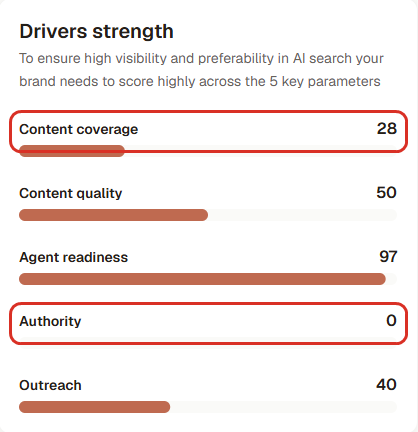
How we read it. The mention worked at the source level: more AI models cite the page that now names us. It did not lift our visibility on those prompts more than our other work did. One mention on one list isn't enough to make AI name us in the answer. That matches what 3RD Diagnostics told us: our authority score is 0, so we need many more third-party sources, not one.
That's a result we can act on. Without the control, we'd have reported "visibility up, citations up 47" and moved on.
How the rest of the loop runs in 3RD:
- Set the goal. Create a Playbook with a goal for a group of prompts, for example "raise visibility on Must-Win comparison prompts in Denmark, on ChatGPT and Google AI Overviews". The goal fixes the prompts, the market, the models and the metric. That's step 1, written down.
- Read the baseline and the noise. On the Overview, switch the period to 90 days to see how the number moves on its own, with model changes marked on the timeline.
- Ship the work and mark the date. Pick the top task from the Playbook. 3RD Agent drafts the page from the task brief; you check it and publish it on your own site. Mark the launch on the timeline so you can read the numbers against it later.
- Check that AI can reach it. Agent readiness tests whether AI crawlers can reach and read your pages.
- Use your controls. The competitor rank shows your competitors on the same prompts. Filter the Overview by topic or prompt type to compare your target group with prompts the change didn't touch. When a task closes, its measured effect compares the targeted prompts with the brand's other prompts for you.
- Confirm in the answers. Open the answers for the target prompts and check whether your page is among the citations.
- Report it. Turn the period into a branded report for leadership. To run your own analysis, pull the data through the Export API or the Looker Studio connector.
What 3RD doesn't do: publish for you, or claim that your work caused the change. You decide what to publish, and you read the result against your controls.
Our data: before-and-after is close to a coin toss
We also looked at what happens across customers once tasks are completed. We took the 117 completed tasks, across 44 brands, where 3RD measured the targeted prompts against a control group of the same brand's untouched prompts (median control size: 37 prompts).
|
Result against the control |
Tasks |
Share |
|---|---|---|
|
- |
- |
- |
|
Moved up by more than 5 points |
34 |
29% |
|
Within ±5 points ("no lift") |
52 |
44% |
|
Moved down by more than 5 points |
31 |
26% |
The median relative change was 0.
That doesn't mean the work doesn't matter. Per-task visibility rests on a handful of prompts, and section one showed how noisy small samples are. It means a single before-and-after reading can't tell a real lift from normal variance. You need the control, the window and the patience.
It's also why we don't publish a "this task will add X points" promise. An estimate tells you what to do first. Only the measurement tells you what happened.
Which tool can prove a GEO change moved your visibility?
No tool can prove causation from AI answers alone. Be wary of any that claims to. What a tool can do is give you the evidence for a strong case. Look for:
|
Capability |
Why it matters for proof |
|---|---|
|
- |
- |
|
Repeated, scheduled runs |
Turns a noisy answer into a readable trend |
|
Visible sample size |
Tells you whether a change is bigger than the noise |
|
Competitor tracking on the same prompts |
Your control for model updates |
|
Model-change markers |
Stops you crediting your page for a new model version |
|
Raw answers and citations per prompt |
Confirms the mechanism: did AI use your page? |
|
Measured effect against a control |
Compares what you targeted with what you didn't, after the work is done |
|
Estimates kept apart from measurements |
Keeps "we expect" apart from "we measured" |
|
Data export |
Lets an analyst run the comparison independently |
How some of the options cover this, as of October 2026, from their own websites:
- 3RD covers the loop above: daily tracking against a Playbook goal, model changes marked on the timeline, a measured effect on completed tasks against the brand's other prompts, competitor views, the answers and their citations, and export through API, CSV, MCP and Looker Studio.
- Profound offers Agent Analytics, which shows how AI bots view, cite and refer to your pages. Data on bot visits is a useful extra signal for step 5.
- Peec AI tracks visibility, position and sentiment over time, with CSV exports, an API and a Looker Studio connector, so an analyst can build the comparison in their own tools.
- Doing it by hand works for one or two prompts, but you'll rarely collect enough answers to beat the noise.
About the data
The 111-brand figures come from brands tracked in 3RD between September 19 and October 18, 2026: more than 18,000 prompts and 732,000 AI answers from up to 11 assistants, anonymized and aggregated, mostly from Nordic markets. The task results cover 117 completed tasks with a control across 44 brands (February to October 2026). The data is observational: correlation, not causation.
FAQ
How long should I wait before judging a GEO change? Four to six weeks for a content change. Models re-crawl and re-learn on their own schedule, so expect days to weeks before a page shows up in answers. Citations to the page often appear before mentions rise.
Why did my AI visibility jump overnight without any change? Because AI answers vary from run to run. Across 111 brands we track, the median brand swings 12.5 points between its best and worst day in a month. Compare 14- or 28-day windows, check whether competitors moved the same way, and check for a model version change.
How many prompts do I need for a reliable test? Enough answers to beat the noise. Brands with fewer than about 100 answers a day see twice the daily swing of brands with 230 or more. Five to fifteen target prompts, run daily across two or more models for four weeks, gives a few hundred answers per window. That's enough to see a change of around 4 to 8 points.
Can I prove that AI visibility increased revenue? Not fully. Most AI answers never produce a click, so no tool can trace every AI-influenced decision. You can show AI-referred traffic from GA4 next to your visibility, and ask new customers how they heard about you. See how to connect AI visibility to revenue.
What's the best single signal that my page worked? AI citing the page for the prompts it targets, and repeating facts that only appear on it. That's direct evidence AI used your work. Visibility, position and recommendations usually follow, but more slowly, as our own outreach test shows.
Start this week: pick one Must-Win topic, write down what you expect, and record two weeks of baseline before you publish. See how 3RD tracks it, or start for free.